
How to Make Money with Canva for Beginners: 5 Ways That Actually Work
Sep 14, 2026You can make money with Canva in five main ways: selling printables, selling Canva templates, offering custom design services, creating designs for print-on-demand products, and producing content you monetize through a platform's partner program. Canva itself is the tool, not the income — the money comes from what you make with it and where you sell it. A free Canva account is enough to get started, though three specific money-making features sit behind Canva Pro: template links, transparent backgrounds, and maximum-resolution downloads.
Key takeaways
- The five routes: printables, Canva templates, custom design services, print on demand, and monetized content.
- Printables and templates are the most beginner-friendly — you design once and sell the same file repeatedly.
- Print on demand needs no inventory and no money upfront. You pay your provider a base cost only after a sale comes in.
- Canva Pro unlocks template links, transparent PNG backgrounds, and high-resolution downloads. You can start free without them.
- Pick one and go deep. Running all five at once is the fastest way to finish none of them.
Here's the thing about Canva that took me way too long to appreciate: it isn't just a design tool. It's a revenue tool.
I use it every single day in my business, and over the years I've watched it quietly become the engine behind several different income streams. Not because Canva pays me. Because of what I make inside it and where I put it.
So let's walk through the five ways, with the actual steps. Zero fluff.
Heads up — some links below are affiliate links, which means I may earn a small commission if you buy through them, at no extra cost to you. I only recommend tools I actually use.
Can you actually make money with Canva as a beginner?
Yes, and you don't need a design background to do it. Canva is built for people who have never opened Photoshop, which is exactly why it has become the default tool for people selling digital products.
That isn't just my opinion. Among the 253 sellers in the 2026 Digital Product Sellers Survey, 51% named Canva as their primary design tool — more than every other tool combined.
What you do need is a real product and somewhere to sell it. Canva handles the making. The rest is on you, and that's the part most "make money with Canva" advice skips right past.
If you want to follow along visually, here's the full walkthrough:
Watch the full walkthrough on YouTube →
1. How do you make money selling printables made in Canva?
A printable is any digital file your customer buys, downloads, and prints — at home or at a local print shop. You sell the file. They do the printing. Nothing ships.
It's a huge category with a lot underneath it:
- Wall art
- Printable activities and games
- Schooling resources and curriculum
- Coloring sheets
- Calendars
- Planners and trackers
Say you're making a piece of wall art. From the Canva homepage, click Create, then either search a preset size like "poster" or click Custom size on the left to enter your own. You can set your units to pixels, inches, millimeters, or centimeters. For this example, an 8x10.
Then you build the design. Open Elements on the left and search for what you want — graphics, photos, videos, frames, even 3D icons. Anything with a little crown in the corner is a Pro element. Anything without one is free for everyone, whatever plan you're on.
Add your text, set your fonts and colors, and you have a product.
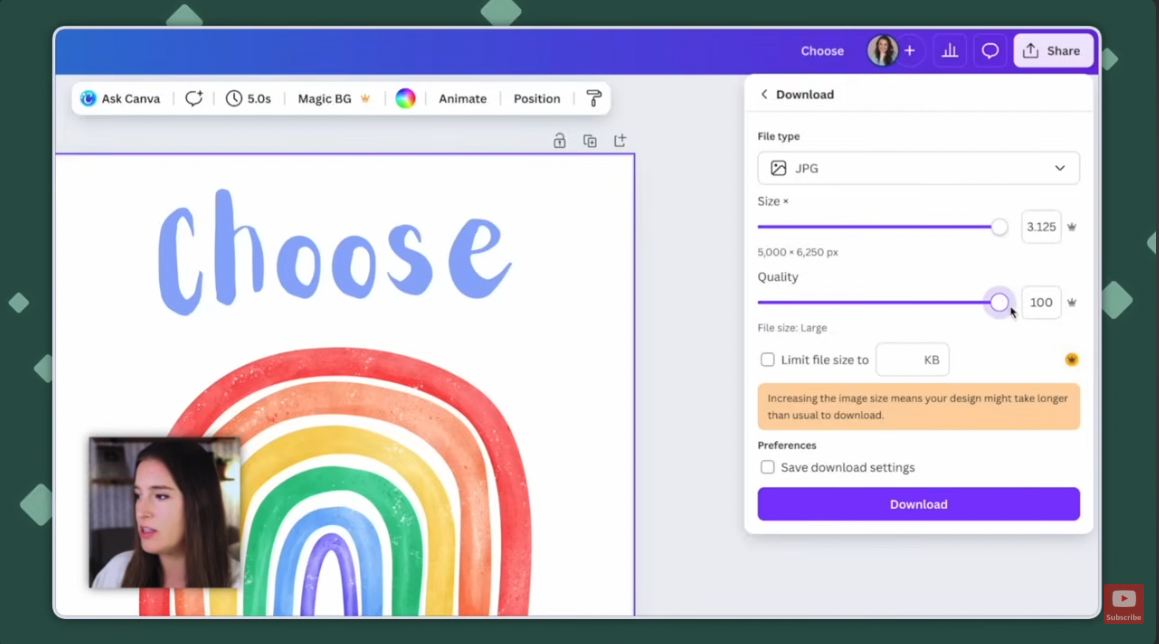
Here's the step people get wrong. When you go to Share → Download, you'll pick a file type — JPG, PNG, PDF. For printable wall art, JPG is usually right. But before you download, push the size slider and the quality slider all the way to the right. That raises your DPI, which is your print resolution.
Skip that and your customer prints a blurry, pixelated mess and leaves you a review about it. For real.
Before you design anything you plan to sell, do the research first. Look at what's actually selling, what sizes buyers expect, and what designs are in demand right now. Making something beautiful that nobody is searching for is the most common way beginners waste a weekend. If you want a head start on what's moving, I broke it down in my guide to the best digital products to sell for beginners.
2. How do you make money selling Canva templates?
With a template, you're not selling a finished file. You're selling something your buyer edits and makes their own — an invitation, a presentation deck, a bundle of social posts, a workbook.
Canva has one feature that makes this work beautifully, and it's the reason templates are such a strong product here: the template link.
When your customer clicks that link, Canva generates a fresh copy inside their account. They edit it, download it, print it, use it however they like. Your original is never touched. Every single buyer gets their own clean copy.
To create one: design your template, then go to Share → See all → Template link → Create template link. Canva generates the URL and you copy it.
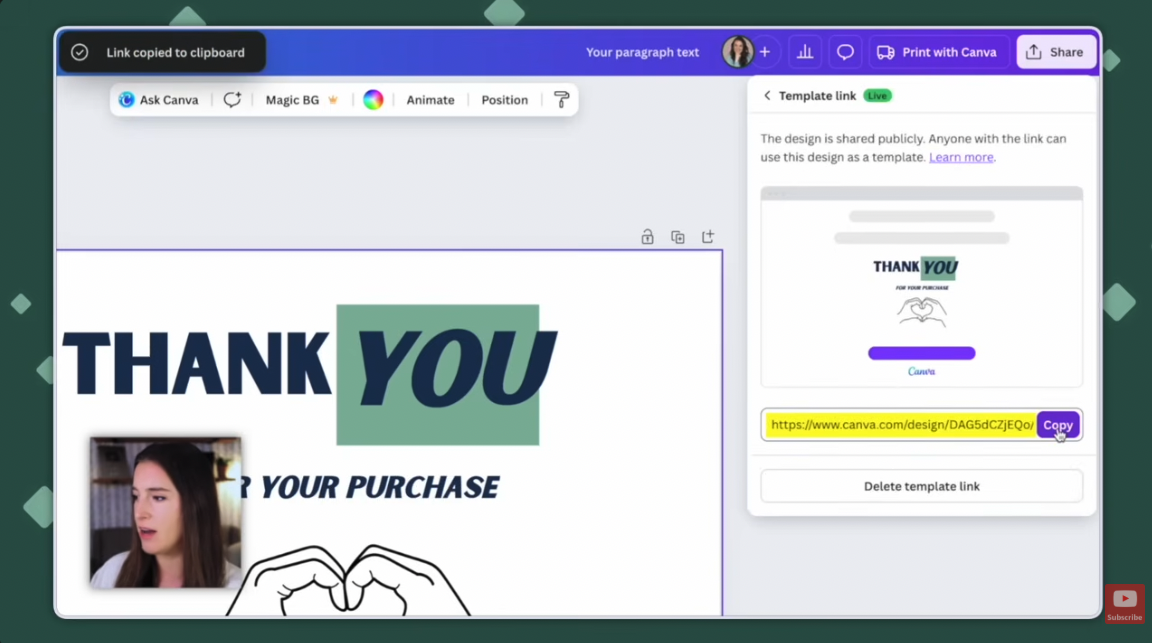
You don't hand over a bare URL, though. Build a simple one-page PDF with instructions and a line that says something like "To access your template, click here," with the link attached. That's your deliverable.
Two things to know: the template link is a Canva Pro feature, and Canva's pre-made font combinations in the text panel are a genuine shortcut — they come with effects like shadows, hollow lettering and background boxes already applied, and you can edit any of it from the Effects menu.
Not sure which file type, size, or resolution to use?
My free Digital Product Starter Guide covers file types, resolution, sizing, and the tools worth using — plus a wall art size chart with the aspect ratios that actually sell, so you're not guessing at dimensions.
3. How do you make money offering design services with Canva?
The first two are products. This one is a service, which changes the math — you're trading time for money, but you get paid faster and you don't need an audience to start.
Someone hires you to design something for them. You talk through their vision, build it, send revisions, deliver the final files. A little one-person design shop.
What people pay for:
- Logos and branding assets
- Flyers
- Marketing materials
- Website graphics
- Social media graphics
Say it's a logo for a candle company. Search "logo" in Create, pick a preset, pull a candle graphic from Elements, and recolor it to their brand colors. Add the business name, and if you want the text curved, select it and go to Effects → Curve.
Small thing that separates clean work from sloppy work: if you're curving two lines of text in opposite directions, match the curve values. If the top reads 88, set the bottom to 88 the other way. Eyeballing it always looks slightly off and clients always notice.
Before you start designing, get their colors, fonts and vision nailed down. Revisions are where service work quietly eats your profit margin.
4. How do you use Canva for print on demand?
Print on demand is the one physical product on this list, and it's the lowest-risk way to sell something tangible. T-shirts, sweatshirts, tote bags, mugs — the catalogs are enormous now.
Here's the model. You partner with a print-on-demand company and sync it to your shop. Your only job is designing and listing. When an order comes in, your provider prints it, packages it, and ships it straight to your customer. You pay them a base cost and keep the rest.
No inventory in your spare room. Nothing paid upfront.
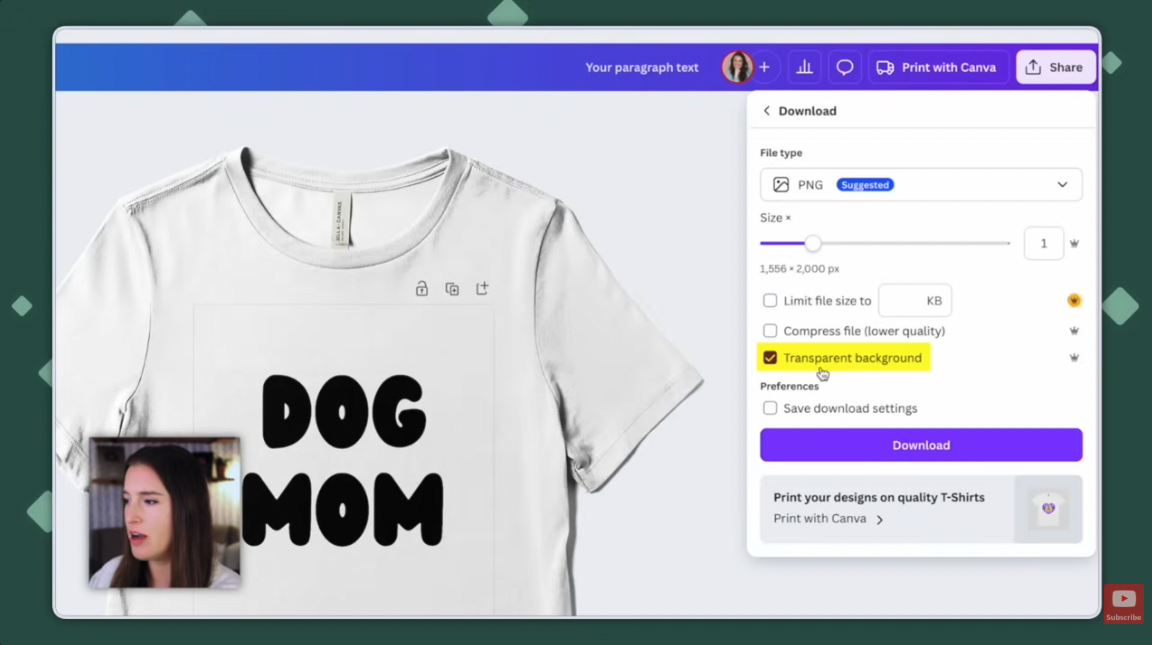
Canva is where the design happens. Pull the exact measurements from your provider's catalog for the specific product you're selling, then set up your Canva design at that size. Canva also has apparel presets — type "shirt" and you get a Bella Canvas mockup you can design directly on, and recolor the garment from the panel on the right.
The download step is the one that matters. Choose PNG and check the transparent background box. PNG is the file type that supports transparency, and you need it because your design is layering onto a physical product. Download a JPG instead and your artwork arrives with a white rectangle around it.
One warning: if you're putting a phrase on a product, check it isn't trademarked before you list it. Plenty of common-sounding phrases are registered, and finding out after you've built a whole shop around one is a bad day.
5. How do you make money creating content with Canva?
This one is indirect but real. You use Canva to create the graphics and videos you post, and you earn through a platform's partner program — Instagram has one, YouTube has one, and several others do too.
YouTube is my favorite for this, because long-form video lets you run ads against it.
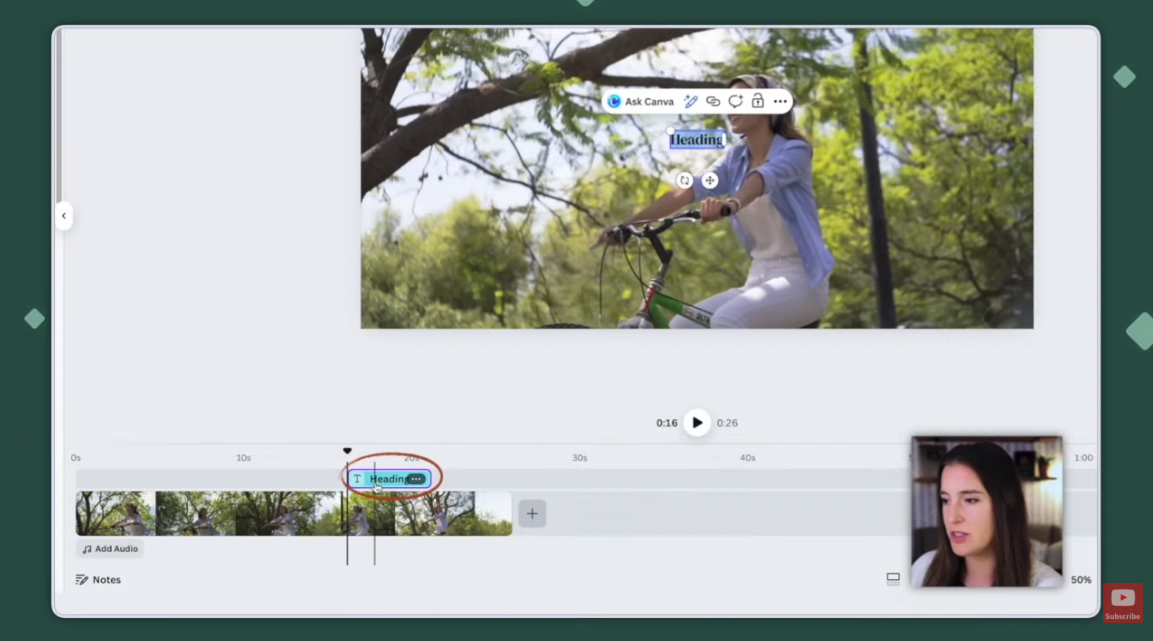
Canva's video editor is now a proper timeline editor rather than the old page-based setup, which means it can handle a full long-form edit. Search "video" in Create and pick the 1920x1080 landscape preset for YouTube, or a vertical size for reels.
Upload your footage, click to drop it onto the timeline, and layer from there. Add a text box and it stacks as its own layer above the clip, visible only for that stretch of video. You can trim from the front or back by dragging the clip edge, add a separate audio track, and add more clips to the sequence. Export as MP4.
Be realistic about the timeline on this one. Every partner program has eligibility requirements — watch hours, follower counts, that sort of thing — so this is a build-up, not a switch you flip in week one.
Which way should you start with?
| Method | Best for | Needs Canva Pro? |
|---|---|---|
| Printables | Total beginners who want the simplest possible first product | Helpful — for max print resolution |
| Canva templates | Anyone who wants repeat sales of one design | Yes — template links are Pro only |
| Design services | People who want paid faster and don't mind client work | No |
| Print on demand | Anyone wanting physical products without inventory | Yes — transparent backgrounds are Pro only |
| Monetized content | People building an audience for the long haul | No |
My honest advice: pick one. Printables if you want the shortest path from opening Canva to having something listed.
And you need fewer products than you think to get going — I dug into how many digital products it actually takes to make a first sale using survey data, and the number surprised a lot of people.
Do you need Canva Pro to make money with Canva?
Not to start. You can design and sell using only free elements and free fonts, and plenty of people do.
But three of the features in this post are Pro-only, and they map directly onto three of the five methods:
- Template links — required to sell Canva templates
- Transparent PNG backgrounds — required for print on demand
- Maximum size and quality downloads — what keeps printables from printing blurry
If you want to test whether it's worth it before paying, there's a free 30-day Canva Pro trial (affiliate link). Thirty days is plenty of time to build a few products and find out.
Frequently asked questions
Can you make money with Canva completely for free?
Yes. A free Canva account gives you access to free elements, free fonts, and standard downloads, which is enough to create and sell printables or offer design services. You'll hit limits if you want to sell templates or design for print on demand, since template links and transparent backgrounds both require Pro.
Is it allowed to sell designs you make in Canva?
Generally yes, but the details depend on Canva's content licensing terms, which govern how stock elements can be used in products you sell. The safest approach is to make your designs genuinely your own rather than lightly editing a stock graphic, and to read Canva's current licensing terms before you list anything. Canva's terms are the authority here, not any blog post — including this one.
Where do you sell products made in Canva?
Etsy is the most common starting point for printables and templates because it brings its own traffic. Other options include Gumroad, Creative Market, Shopify, and your own website. For print on demand you sell through a shop synced to your provider, and for design services you find clients directly or through freelance platforms.
What's the easiest thing to sell as a complete beginner?
Printables. There's no template link to generate, no provider to sync, and no client to manage — you design a file, download it at high resolution, and list it. Wall art, planners, and trackers are the usual first products.
How long does it take to make your first sale?
It varies widely, and anyone quoting you a guaranteed timeline is guessing. Among sellers surveyed in the 2026 Digital Product Sellers Survey who had made a sale, the most common wait was one to two months, though plenty waited longer and still got there.
What file type should you download from Canva?
JPG for printable wall art and most print files. PNG with a transparent background for print-on-demand designs that layer onto a product. PDF for multi-page printables like planners and workbooks. MP4 for video.
Ready to turn this into an actual business?
Digital Product Powerhouse is my free 45-minute masterclass walking through the four steps to take when you're starting out with digital products — so you're not guessing at what to make, what to charge, or how anyone finds it. It's on demand, so you can watch whenever.
So — which of the five are you starting with? Hit reply on my next email and tell me. I read every one.
Not on my list yet? Grab the free Digital Product Starter Guide and you'll be automatically added!
