

7 AI Business Ideas for Beginners (No Coding Required)
Nov 09, 2026The best AI business ideas for beginners are content editing and repurposing services, homeschool and parenting printable bundles, printable wall art, an AI coach clone, print-on-demand products, custom GPTs, and Canva invitation templates. None of them require coding or a tech background. In each one, AI is the tool that speeds up the work. The business is still a real product or service that solves a real problem for a specific customer.
Key Takeaways
- No coding needed. Every idea here runs on beginner tools like Canva AI, ChatGPT, and Descript.
- AI is the time-saver, not the business. You're still selling something a real person needs.
- Three of the seven are digital products, with no inventory and low startup costs.
- Bundles beat single items. Grouping products together lets you charge more per sale.
- Pick one idea and commit. Trying all seven at once is the fastest way to finish none.
Let's be real for a second.
Most "make money with AI" content online reads like it was written for software engineers. Or by a robot trying to sell you a $7 ebook.
This isn't that. These are seven ideas I'd actually hand a beginner, using the same tools I use in my own business every week. Zero fluff. Let's go.
Heads up — some links below are affiliate links, which means I may earn a small commission if you buy through them, at no extra cost to you. I only recommend tools I actually use.
What makes an AI business idea good for beginners?
A beginner-friendly AI business has three things going for it. It needs no coding. It costs little or nothing to start. And AI shortens the part you'd otherwise need to be an expert at, like design, video editing, writing, or coaching.
That last part is the whole game. AI doesn't replace the business. It replaces the years you'd have spent learning Photoshop or Premiere Pro.
And you're in good company. Among the 253 respondents in my 2026 What Actually Works for Digital Product Sellers survey, 80% said they already use AI tools in their business (203 of 253).
So the question isn't whether to use AI. It's what to build with it.
Watch me walk through all 7 ideas on YouTube →
What are the 7 best AI business ideas for beginners?
Here's the full list. Then we'll break down each one: what it is, which AI tools to use, and where to sell it.
- Content editing and repurposing services
- Homeschool and parenting resource bundles
- Printable wall art
- An AI coach clone
- Print-on-demand products
- Custom GPTs
- Canva invitation templates
1. Content editing and repurposing services
Best for: people who enjoy video and want a service business with recurring clients.
Business owners and content creators know they should edit their videos and turn them into clips for Reels, TikTok, and YouTube Shorts. Most of them don't have the time or energy to do it.
That's where you come in. You either edit their long-form videos, or you take one long video and repurpose it into several short clips for different platforms. One video in, a whole week of content out.
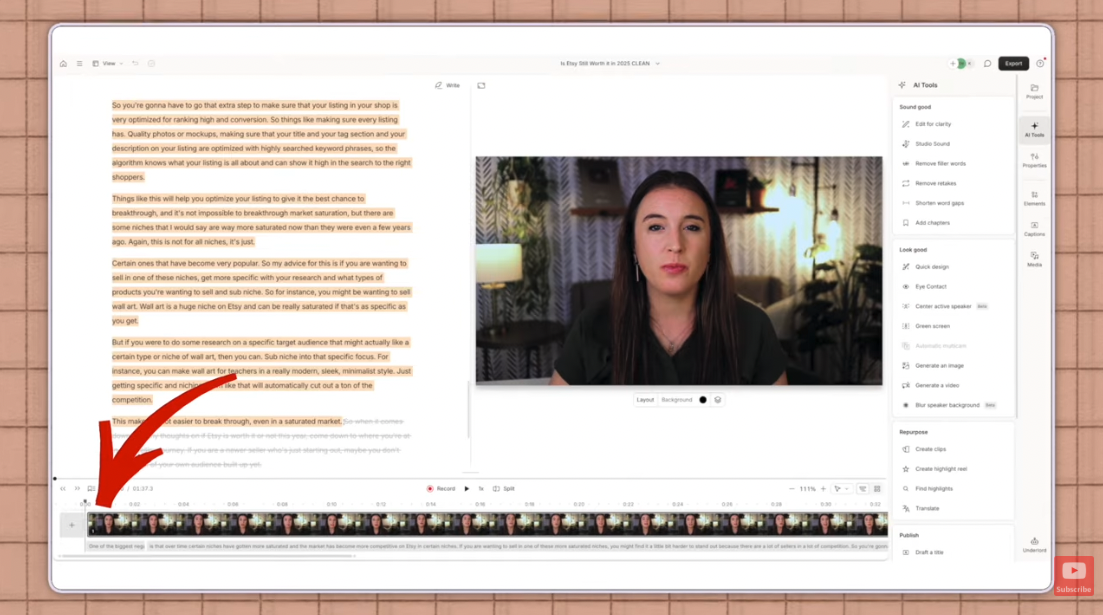
The AI tools: Descript is my fav here. It's a text-based editor, so it transcribes your video and you edit the words like a document. Its AI can add studio sound, remove filler words, shorten pauses, and pull clips from a longer video.
Canva's upgraded video editor has AI built in too: background removal, highlight pulling, AI voiceovers, audio cleanup, and automatic captions. Some of those need Canva Pro, which you can try free for 30 days.
How to sell it: as a weekly content package (a set number of pieces each week) or a monthly retainer.
Where to find clients: list your services on Upwork or Fiverr, or reach out directly. Find a creator who clearly isn't repurposing, edit one of their videos as a sample, and send it with a short, friendly message. Showing beats telling every time.
2. Homeschool and parenting resource bundles
Best for: parents, teachers, and anyone who loves getting organized.
These are digital tools that help parents manage routines, behavior, and homeschool planning. Think weekly homeschool planners, morning and bedtime routine charts, chore charts by age, lesson planning templates, and calm-down charts.
Parents want these. They just don't want to build them from scratch at 10 p.m.
Why bundles win: instead of selling one chart, sell a set, like a Pre-K homeschool bundle or a behavior-and-chore bundle. You can charge a higher price, and the buyer gets everything in one purchase.
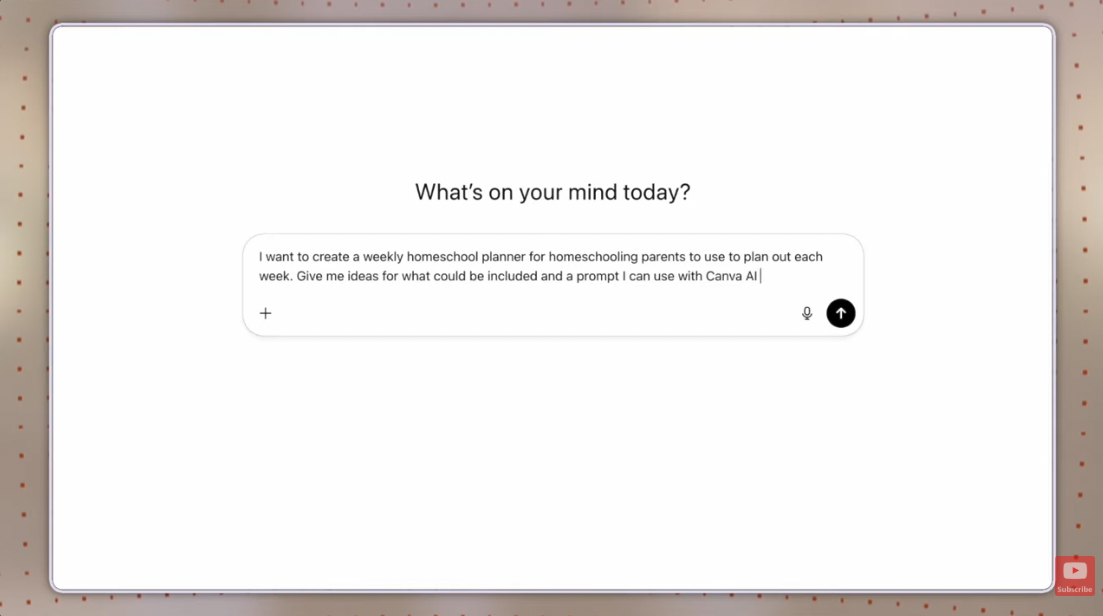
The AI tools: start in ChatGPT to brainstorm. Try a prompt like: "I want to create a weekly homeschool planner for homeschooling parents to plan out each week. Give me ideas for what could be included and a prompt I can use with Canva AI to generate the design."
Paste the prompt it gives you into Canva AI, open the result in the editor, and change the colors, fonts, or wording until it's yours.
Where to sell it: Etsy, your own site on Shopify, or Facebook groups for homeschoolers and parents. Share genuinely helpful advice there and post links now and then, following each group's rules.
3. Printable wall art
Best for: creative types who want a product with zero inventory.
Printable wall art is digital artwork your customer downloads and prints at home, in whatever size and frame they want. They get it instantly. You never store or ship a thing.
The niches are endless: nursery art, Christian and faith-based quotes, motivational prints for a home office, seasonal decor, and gallery wall sets (boho, skyline, art deco, you name it). Sell single designs, or bundle a matching set into one listing to raise your price per sale.
The AI tools: Midjourney, Kittl AI, Canva AI, or ChatGPT. My tip: generate the image in ChatGPT, then bring it into Canva to finish it. Whatever tool you use, a detailed prompt is what makes the difference.
Want more product ideas in this lane? Here's my breakdown of the best digital products to sell for beginners.
Seven not enough? I put together a free list of 50+ ways to make money with AI so you can find the idea that actually fits you. Grab it and pick your lane.
4. An AI coach clone
Best for: coaches, teachers, and experts who don't want to trade every hour for a one-on-one call.
An AI coach clone is a version of you, trained on your content, that answers questions and coaches your audience around the clock.
I built my own with a tool called Delphi. I uploaded years of my social media content, YouTube videos, and course lessons, so it teaches my actual strategies. I also trained it on my voice. Students can text it, or call in and talk to it, and it sounds like me. (Still a little wild, for real.)
How to sell it: as a monthly membership, as a feature inside a course you already sell, or as an optional upsell.
Everyone wants support, but not everyone can afford pricey one-on-one coaching. A clone gives people something close to it, and you're no longer capped by your calendar.
5. Print-on-demand products
Best for: people who want to sell physical products without buying or storing inventory.
With print-on-demand, you create the design and a print partner handles everything else: printing, packing, and shipping straight to your customer. You don't pay anything until you make a sale. Then you pay the provider the base cost and keep the rest.
Popular products include t-shirts and sweatshirts, mugs, tumblers, tote bags, and canvas prints.
The AI tools: design in Canva AI or Kittl AI, download the file, and upload it to a provider like Printify or Gelato. Connect the provider to your Etsy or Shopify shop, and new orders go straight to them to fulfill.
6. Custom GPTs
Best for: anyone who knows a specific audience's problems really well.
A custom GPT is an AI assistant built for one job or one audience. It's like ChatGPT, but set up to handle a narrow set of questions really well instead of everything.
Your buyers are usually coaches, educators, online business owners, content creators, service providers, parents, homeschoolers, or entrepreneurs.
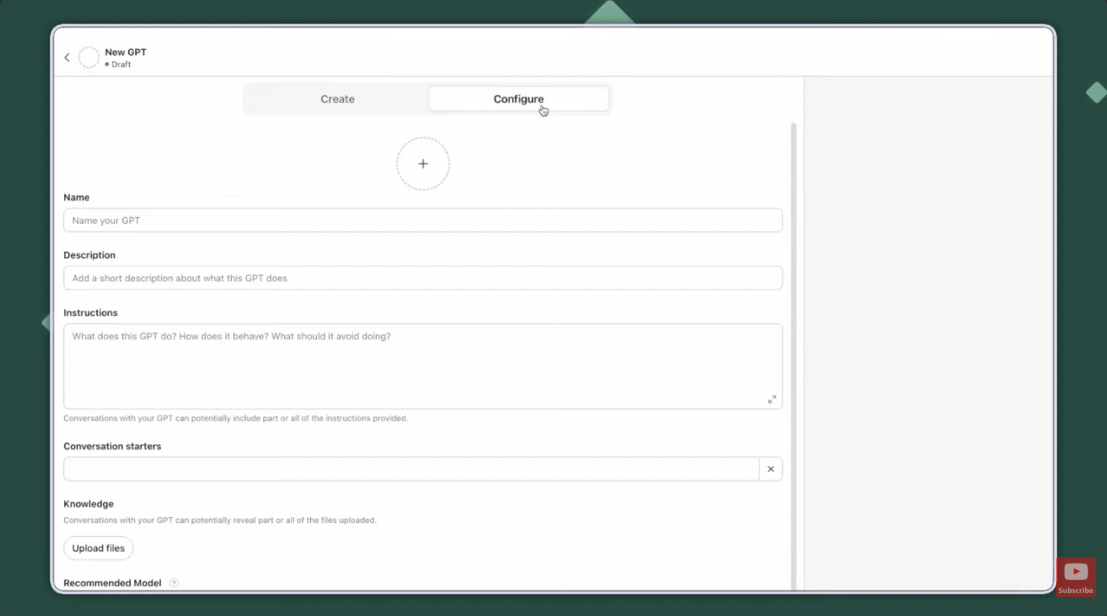
How to build one: in ChatGPT, click Explore GPTs, then Create. Use the Configure tab to add a name, description, instructions, and conversation starters. The part that matters most is the knowledge section, where you upload files for your GPT to reference.
I use two in my own business: an email marketer and a caption writer. My email GPT has my brand guide and course names in its knowledge files, so its drafts already sound like me.
Here's a gap worth noticing. In the same survey, only 16% of AI users said they use AI for customer emails (33 of 203). A custom GPT that writes emails for one specific type of business is a tool very few people are building yet.
How to sell it: as monthly access, a one-time lifetime license, or a bonus tool inside a course you already sell. What you're actually selling is the access link.
7. Canva invitation templates
Best for: Canva lovers who want an easy first product.
When people need an invitation now, most go online looking for something they can edit and then send digitally or print. You design it in Canva and sell a template link, not the invitation itself.
Your buyer opens their own copy inside their Canva account and edits it. Your original never changes.
Birthdays, baby showers, weddings, graduations. The options go on and on. Bundles work here too: think a wedding set with the invitation, RSVP card, and seating chart.
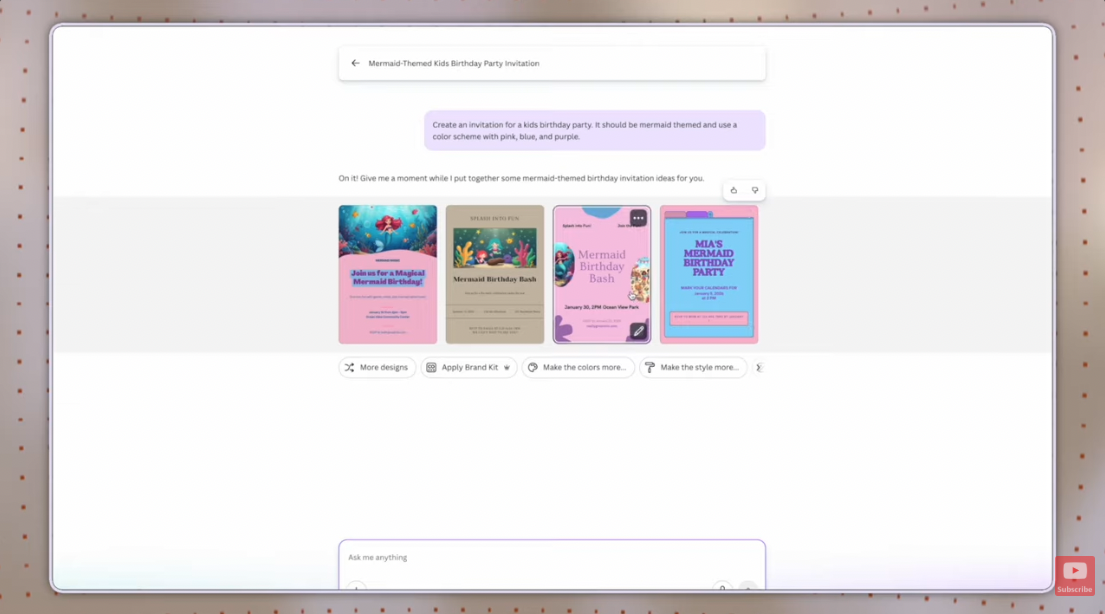
The AI tools: Canva AI. Try a prompt like: "Create a birthday party invitation for kids that is mermaid themed in a pink, blue, and purple color scheme." Then open the design in the editor and adjust it. You'll need Canva Pro to create the shareable template link, and you can try Canva Pro free for 30 days.
Where to sell it: Etsy, your own website, or social media.
Which AI business idea should you start with?
Here's a quick way to match an idea to you.
| Idea | Type | Best if you... | Main AI tools |
|---|---|---|---|
| Content editing | Service | Like video and want recurring clients | Descript, Canva |
| Homeschool bundles | Digital product | Love organizing | ChatGPT, Canva AI |
| Printable wall art | Digital product | Love design | Midjourney, Kittl, Canva AI, ChatGPT |
| AI coach clone | AI tool | Already teach or coach | Delphi |
| Print-on-demand | Physical product | Want physical goods with no inventory | Canva AI, Kittl |
| Custom GPTs | AI tool | Know one audience's problems well | ChatGPT |
| Invitation templates | Digital product | Want an easy first product | Canva AI |
If you're brand new, a digital product (bundles, wall art, or invitation templates) is the simplest start. No clients to manage and no inventory to store.
Then pick one. Real talk: trying all seven at once is how you end up finishing none.
Do you need tech skills to start an AI business?
No. Every idea on this list runs on tools built for non-techies, like Canva, ChatGPT, and Descript. If you can type a sentence describing what you want, you can use them.
The skill that actually matters is knowing your customer. AI can draft a chore chart in seconds. It can't tell you which parents need one or why they'd choose yours. That part is still you.
Frequently Asked Questions
What is the easiest AI business to start as a beginner?
Digital products like printable wall art or Canva invitation templates are usually the easiest. There are no clients to manage and no inventory, and you can create them with Canva AI or ChatGPT. Once a product is listed, it can sell again and again without extra work per order.
Do I need to pay for AI tools to start an AI business?
Not necessarily. Canva, ChatGPT, and Descript all offer free plans. Some features, like creating Canva template links and certain AI video tools, require Canva Pro, which has a free 30-day trial.
Can I sell products made with AI on Etsy?
Yes, Etsy allows items created with the help of AI tools. Check Etsy's current seller policies before you list, since its rules on how to describe AI-assisted items can change. Editing and customizing AI designs in Canva also helps your products stand out.
How do you sell a custom GPT?
You sell access to it. Once your GPT is built, you share its link with buyers through a monthly membership, a one-time lifetime license, or as a bonus inside a course. Buyers open it in ChatGPT, so they'll need their own ChatGPT account.
Is print-on-demand a digital product?
No. Print-on-demand items are physical products like t-shirts and mugs. You create the digital design, but the print-on-demand provider produces and ships the physical item to your customer.
How many products do I need before I make my first sale?
Fewer than most people think. I dug into the real numbers from my survey in How Many Digital Products Do You Need to Make Your First Sale?
Ready to turn one of these ideas into a real digital product business?
My free Digital Product Powerhouse masterclass walks you through the four steps to start and grow a profitable digital products business, in about 45 minutes. It's made for beginners who want a little guidance on getting to their first sales.
So, which of these seven are you most excited to try? Hit reply on my next email and tell me. I read every one.
Not on my list yet? Grab my free list of 50+ ways to make money with AI and you'll be automatically added!
