
How to Sell Canva Templates on Etsy (Step-by-Step for Beginners)
Oct 05, 2026To sell Canva templates on Etsy, design an original template from scratch in Canva using only free elements, generate a Canva template link, and place that link inside a clickable PDF. Upload the PDF to an Etsy listing set as a digital file, add mockup images, and publish. When a buyer downloads the PDF and clicks the link, Canva opens an editable copy of the template in their own Canva account.
Key Takeaways
- Design from scratch. Canva doesn't allow you to sell its pre-made library templates as your own.
- Use only free Canva elements, photos, and fonts inside the template so buyers on free accounts can edit it.
- Etsy can't deliver a Canva link directly, so buyers get a PDF with your template link inside.
- Download that PDF with "Flatten PDF" unchecked, or the link won't be clickable.
- Mockup images sell the template, and Canva Pro elements are fine to use in them.
Heads up: some links below are affiliate links, which means I may earn a small commission if you buy through them, at no extra cost to you. I only recommend tools I actually use.
Canva templates are one of my fav digital products to sell.
You create them once, and they can sell over and over without you lifting another finger. They've been around a while, and buyers still want them.
Real talk, though: the setup trips people up. Template links, deliverable files, mockups. It's a lot the first time. So here's every step, start to finish.
Can you legally sell Canva templates on Etsy?
Yes, as long as the design is yours.
Canva has strict rules here. You can't grab a template from Canva's library, tweak it, and sell it. You have to build your template from scratch.
Inspiration is totally fine, though. Browse Canva's template library or what's already selling on Etsy. Then make your own version with your own twist.
Watch the full Canva template tutorial on YouTube →
What type of Canva template should you sell?
Start with the broad product category. The options are wide open:
- Invitations
- Business branding assets
- Marketing assets like flyers and brochures
- Logos and email signatures
- Social media post templates for Instagram, Facebook, and Pinterest
Do a little market research on Etsy to see what's already being sold. Then look for a subtype you can own.
Social media templates are one of the best-selling types. If you go that route and get stuck on what the posts should actually say, grab my free Social Media Template Ideas Vault. It's 95 content prompts across five categories: sales and promotional, engagement, about us, educational, and inspirational and fun.
Templates are on a lot of radars right now. Among the 253 respondents in my 2026 Digital Product Sellers Survey, 40% said they want to add Canva templates to their product lineup. Only printables ranked higher.
How do you choose a niche for your Canva templates?
Go from broad to specific. There are two ways to do it:
- Audience niche: social media templates made for real estate agents, or invitations made for weddings.
- Style niche: boho, modern, or whimsical with pastel colors.
Either way, the goal is focus. A tight set of templates for one buyer beats a random pile for everyone.
Spoiler alert: you don't need a giant shop to start. Among the 93 sellers in our survey who had made a sale, 57% made their first one with 10 or fewer products listed. More on that in How Many Digital Products Do You Need to Make Your First Sale?
How do you design a Canva template to sell?
Open Canva and work through these steps. (No Canva account yet? Here's a free 30-day Canva Pro trial.)
- Start in the right size. Click Create in the top left corner. Look up similar templates on Etsy to see what size other sellers use. Canva has presets for most things. An Instagram 4:5 post, for example, is 1080 x 1350 pixels. Or click Custom size and enter the width and height in pixels, inches, millimeters, or centimeters.
- Name your project. Add a title in the top right corner. Your buyer will see this name, so make it clear, like "Real Estate Instagram Post."
- Build with the Elements and Text tabs. Elements holds graphics, icons, illustrations, photos, and frames. Frames are shapes you drag a photo onto, and the photo snaps right into the shape. They're a quick way to get a polished look.
- Use free content only. Canva Pro items have a small crown icon in the corner. Skip those, including Pro fonts. Your buyer might only have free Canva, and you don't want them paying to remove watermarks.
- Add pages for a bundle. Selling a set? Click to add a new page for each template. To make a variation fast, use Duplicate page and shift things around.
Nervous about starting from a blank page?
I see you. Grab my free Canva Digital Product Template Bundle. It's three template sets in three different styles, and commercial use is included. Sell them as your own, or use them as a starting point to practice.
How do you create a Canva template link?
When your design is done, click Share in the top right corner, then Template link. If you don't see it, click See all. Then click Create template link.
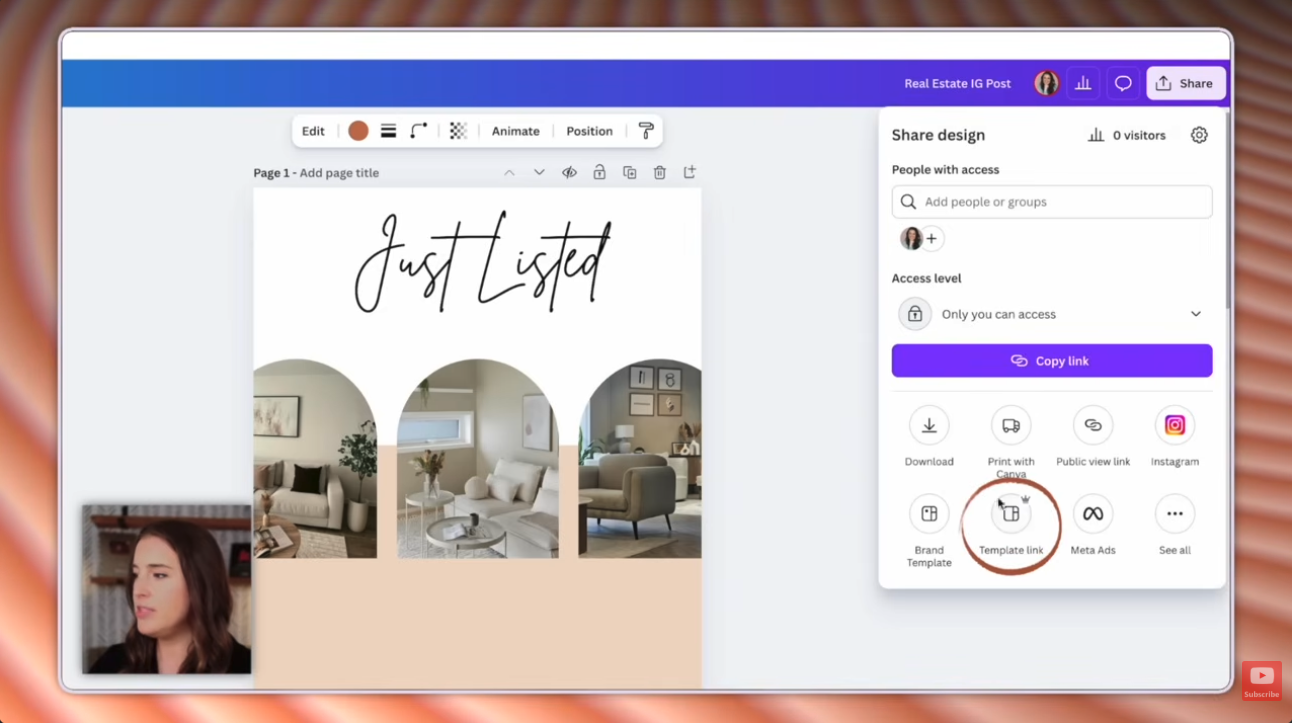
This link is what your buyer gets. When they click it, Canva opens a brand-new copy in their own Canva account. Your original is never touched.
A heads up on Pro: when I filmed my tutorial, Template link had a little crown next to it, which means Canva Pro. Canva shifts which features need Pro from time to time, so check your own Share menu. If you see the crown, the free 30-day Canva Pro trial covers it.
Keep this tab open. You'll need the link in the next step.
What do buyers get when they buy a Canva template on Etsy?
A PDF.
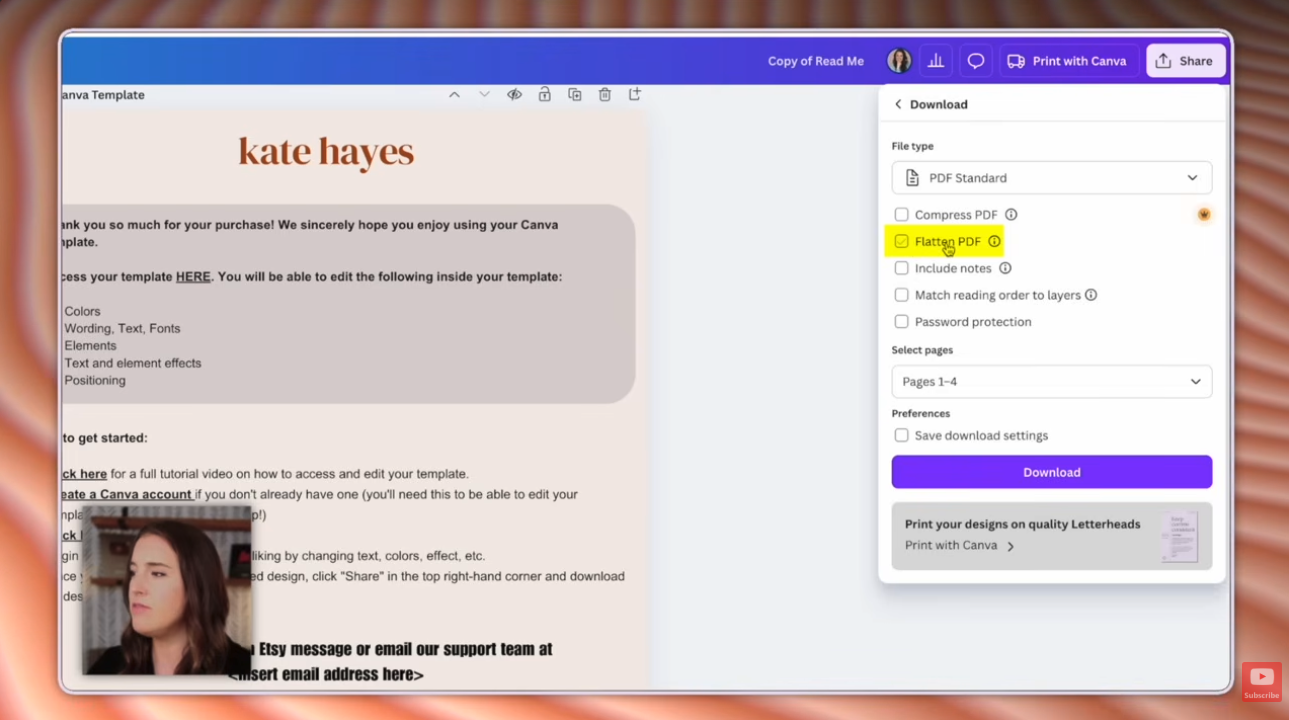
Etsy can't deliver a Canva link on its own. So you build a one-page deliverable file, sometimes called a readme or instructions file, and put your template link inside it.
- Create a new Canva design. Size doesn't matter much; US Letter (8.5 x 11 in) works great.
- Remind your buyer what they purchased and what's included.
- Add quick start steps for Canva newbies: how to create a free Canva account, then how to open and customize the template.
- Optional marketing extras: links to connect on social media, a reminder to leave a review, or a discount code for their next purchase.
- Highlight the text you want linked, like "Access your template here." Click the link icon on the floating toolbar, paste your template link, and click Done.
- Click Share → Download and choose PDF Standard.
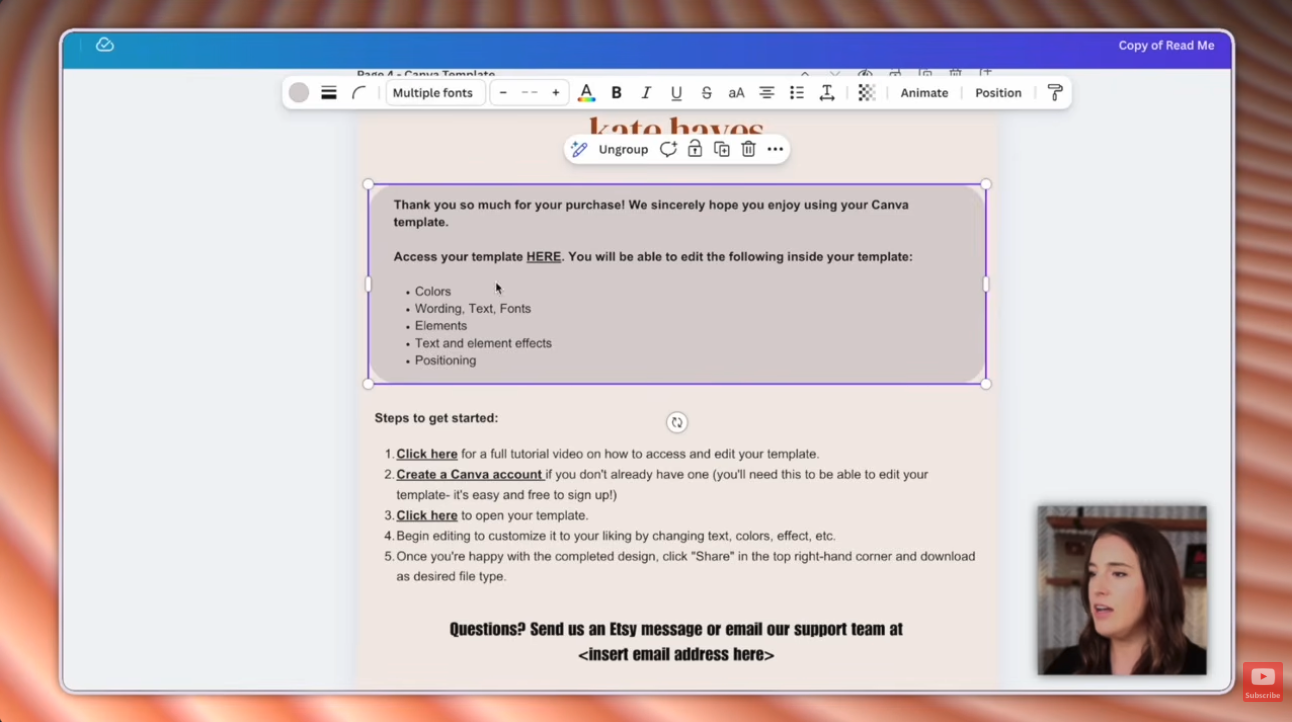
Leave "Flatten PDF" unchecked. Flattening makes your link unclickable, which breaks the whole product. It's one tiny checkbox, and it's the difference between a working product and a confused buyer.
How do you make mockups for Canva templates?
Mockups show buyers what they're getting. It's hard to picture a digital product, so these images do the heavy lifting on your listing.
Browse listings in your niche on Etsy for style ideas. Here's how to build the angled-grid mockup from my tutorial:
- Add frames. Go to Elements → Frames and add a square frame. Resize it to match your template sizes: taller for story-size templates, shorter for square posts.
- Add shadows. Search "shadow" in Elements and click Graphics. Place one under each frame. If it shows up on top, right-click → Layer → Send backward.
- Group and repeat. Select a row of frames and shadows, click Group, then duplicate the group across the page. Group everything, enlarge it, and rotate it to an angle.
- Add your template images. Download your templates as PNG or JPG files (or take screenshots). Upload them in the Uploads tab and drag each one into a frame.
- Add text. Place a shape as a banner and add text on top, like how many templates are in the bundle.
- Download the mockup as a JPG or PNG.
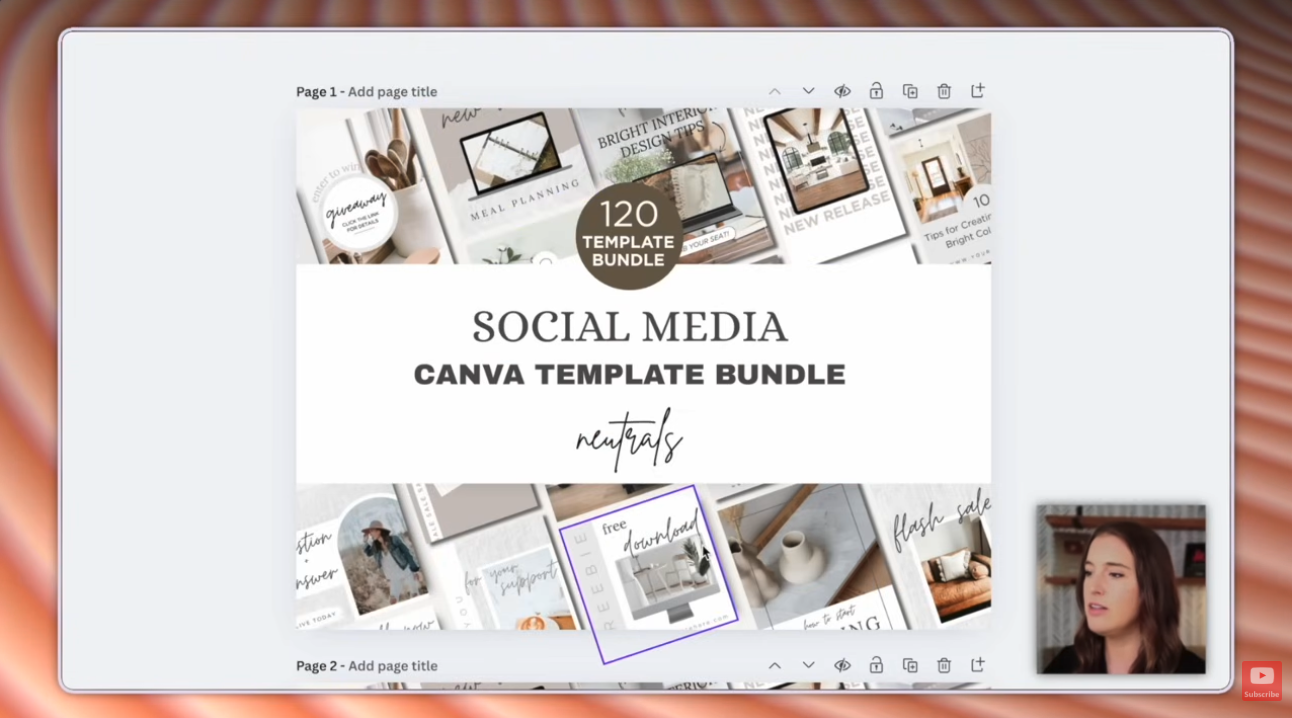
Plot twist: Canva Pro elements are fine here. Buyers never edit your mockup, so the free-only rule applies to the template, not your listing photos.
How do you list a Canva template on Etsy?
Don't have a shop yet? Open your Etsy shop with 40 free listings through my invite link.
- In Shop Manager, click Listings, then Add a listing.
- Pick a category. Type "templates" and choose the closest match, like Social media templates.
- Choose Digital file, then answer the prompts: who made it, what is it, and when it was made.
- In Photos and video, upload your mockups. You can add up to 20 photos and a video. Use several mockups, plus a few infographic-style images that spell out what's included.
- In Digital files, upload your deliverable PDF. That's the only file your buyer needs.
- Fill in the title, description, price, and tags. Then click Publish.
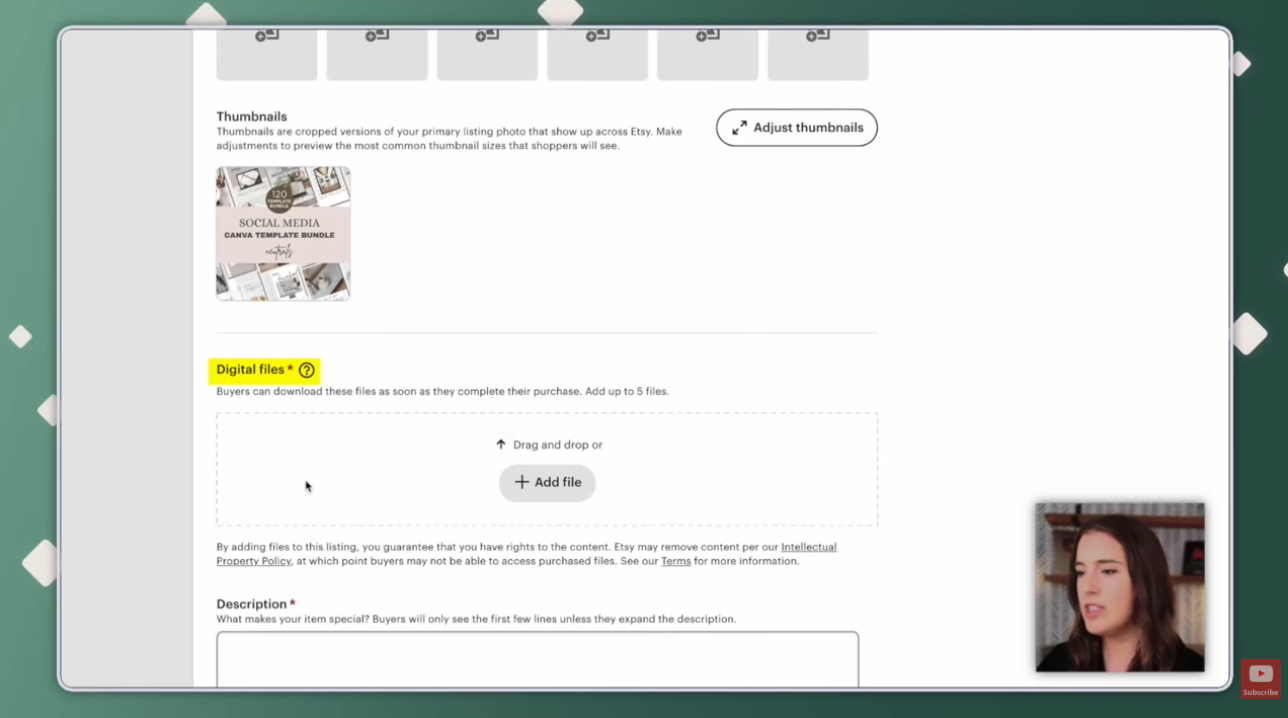
Before you hit publish, open your PDF and click the link yourself. Your future self will thank you.
Frequently Asked Questions
Do you need Canva Pro to sell Canva templates?
You can design templates on a free Canva account, but the Template link option has required Canva Pro, marked with a small crown icon. Canva changes which features need Pro from time to time, so check the Share menu in your own account. If you see the crown, Canva's free 30-day Pro trial covers it.
Can you sell templates from Canva's template library?
No. Canva does not allow you to sell its pre-made library templates as your own products. Design your templates from scratch. It's fine to look at Canva's library or Etsy listings for inspiration, as long as what you sell is your own original design.
Should you use Canva Pro elements in a template you sell?
Not in the template itself. Many buyers use free Canva accounts, and Pro elements would leave them with watermarks or extra costs. Stick to free elements, photos, and fonts in the template. Pro elements are fine in your mockup images, because buyers never edit those.
Can buyers change your original Canva design?
No. When a buyer clicks your template link, Canva creates a brand-new copy in their own Canva account. Every buyer gets their own copy, and your original design is never touched.
Why isn't the link in my Canva PDF clickable?
The PDF was most likely downloaded with Flatten PDF checked. Flattening makes links unclickable. Download it again as PDF Standard with Flatten PDF unchecked, then upload the new file to your Etsy listing.
How many templates should be in a Canva template bundle?
There is no set number. Look at similar listings in your niche on Etsy to see what bundle sizes buyers expect. In Canva, add each template as a new page in the same design, and use Duplicate page to build variations quickly.
How much does it cost to list a Canva template on Etsy?
Etsy charges a $0.20 listing fee per listing, plus fees when an item sells. Opening a shop through an invite link can get you some listings for free.
Ready to build a real digital products business, not just one listing?
My free Digital Products Masterclass is a 45-minute deep dive into how to start and grow a profitable digital products business. Zero fluff, just the 4-step system I teach.
So, what kind of Canva template are you making first? Hit reply on my next email and tell me. I read every one.
Not on my list yet? Grab my free Canva Digital Product Template Bundle and you'll be automatically added!
