
How to Create a Lead Magnet with AI: Build an Interactive Tool with Claude (2026)
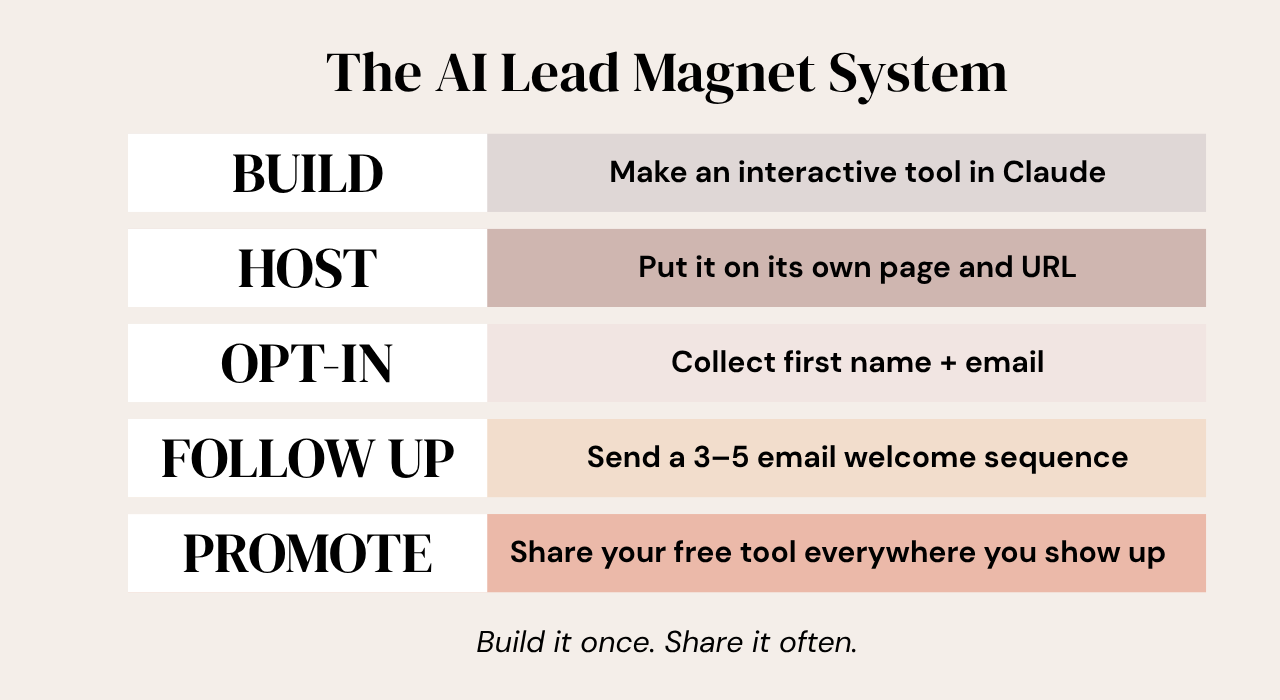
Oct 26, 2026To create a lead magnet with AI, build a free interactive tool in Claude, such as a quiz, calculator, or generator. Then host it on its own page, put an opt-in form in front of it, and connect that form to an automated welcome email sequence. Subscribers get an instant, personalized result, and you get their email address plus a way to follow up without doing it by hand. The process has five steps: build the tool, make it live, create the opt-in page, set up a welcome sequence, and promote it.
Key Takeaways
- A lead magnet is a free, useful thing people get in exchange for their email address. An interactive tool gives each person a personalized result instead of a static download.
- Five steps: build the tool in Claude, make it live, create an opt-in page, set up a welcome sequence, and promote it.
- Ask Claude for an artifact so you can test the tool inside the chat and revise it with plain-English prompts.
- Keep the opt-in form to two or three fields and redirect new subscribers straight to your tool.
- A three-to-five email welcome sequence handles the follow-up automatically.
What if you built something once, and it kept pulling people into your business while you were off living your life?
No chasing followers. No ad budget. Just one useful tool and a system that follows up for you.
I built one with Claude, and I'm walking you through the whole thing, start to finish. Zero fluff. Here's the system at a glance:
What is an interactive lead magnet, and why make one?
A lead magnet is something free and useful that you give people in exchange for their email address. Once they're on your list, you have a direct line to share your content, your offers, and your products.
Most people won't join another newsletter just because you asked. They want something back. That's the whole reason lead magnets exist.
The classic version is a PDF checklist, download guide, or cheat sheet. That's fine. But it's static. It doesn't deliver a result, and it relies on the person taking that information and doing something with it on their own.
An interactive tool works differently. It's not something they download. It's something they use. A few examples:
- A quiz that gives each person a personalized result
- A calculator that tells someone how to price their product
- A generator that creates something custom based on their answers
In my experience, that kind of experience feels far more valuable, and I've seen interactive tools work better than a static PDF guide. Your results may vary, but it's worth testing.
It's also a smarter plan than hoping social media alone fills your list. Among the 147 sellers in the 2026 What Actually Works for Digital Product Sellers survey who named advice that didn't work for them, the most common answer was "just post on social media and sales will come" (9%, 13 of 147).
A list you own gives you a place to show up that doesn't depend on an algorithm.
Watch me build the whole thing on YouTube →
How do you create a lead magnet with AI in Claude?
Step one is to pick a format and let Claude map it out. A quiz, a generator, a calculator, a planner, or a tracker all work. Then use Claude to map the questions, the logic, and the result copy.
For my demo, I built a 30-day meal planner for people just starting their health and fitness journey. Here's the prompt I gave Claude:
I'm a health and fitness professional and personal trainer. I want to create an interactive meal plan generator tool to use as a lead magnet. It should keep in mind my target audience of people who are just starting their fitness journey and are seeking guidance. It needs to ask the user five to six simple questions and then give them a result based on their answers, giving them a healthy meal plan for the next 30 days. Build it as a Claude artifact and ask me any questions you need to clarify what I'm asking you to do.
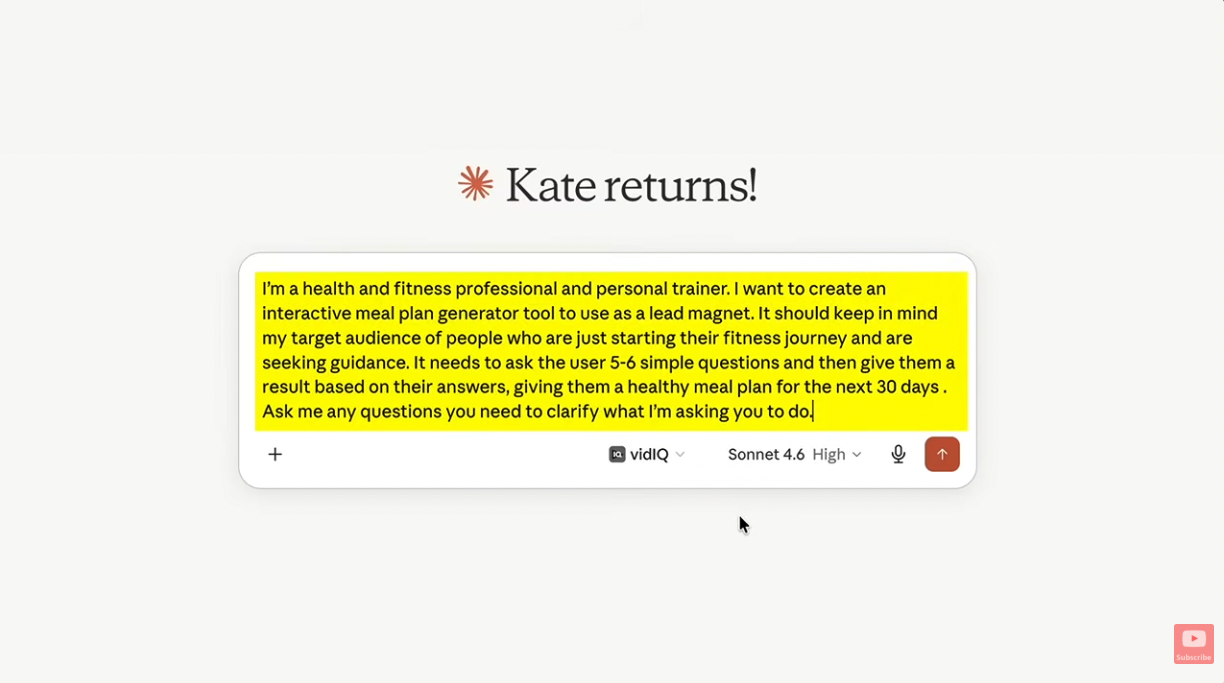
Notice that last line. Asking for a Claude artifact means you can test the tool right inside the chat while you revise it. You click through the questions and see the exact result a subscriber would get.
Claude asked clarifying questions before it built anything. It wanted to know the primary goal for users, any dietary restrictions or preferences, how I wanted it structured, whether the tool should collect a name and email, and any branding or call-to-action details. I told it not to collect emails inside the tool, because we'll handle that on the opt-in page.
The first version already looked great. It had my five questions, my brand colors, a few cute emojis, and a progress bar so people can see how far along they are. The results page gave me a 30-day meal plan.
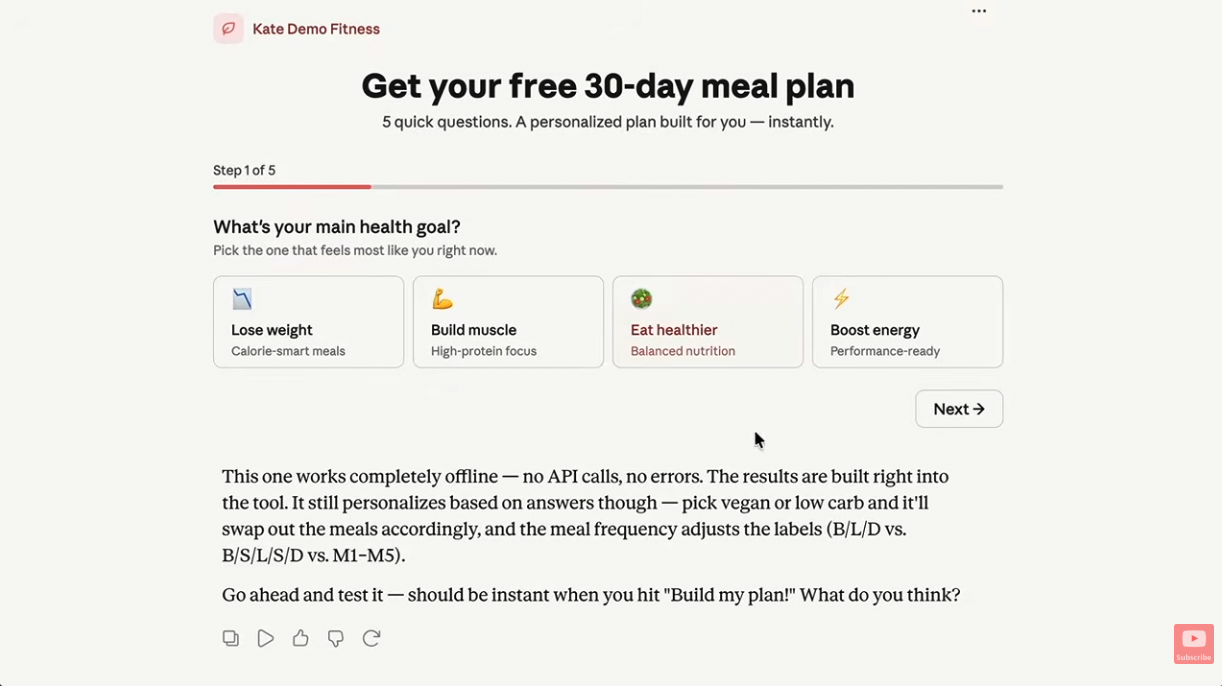
Then I revised it with plain-English follow-ups:
- "Good, but add in a customized grocery list for each week based on the exact meals that are given in the results." Claude added a "view grocery list" drop-down for each week.
- I asked for a very light cream background across the whole page.
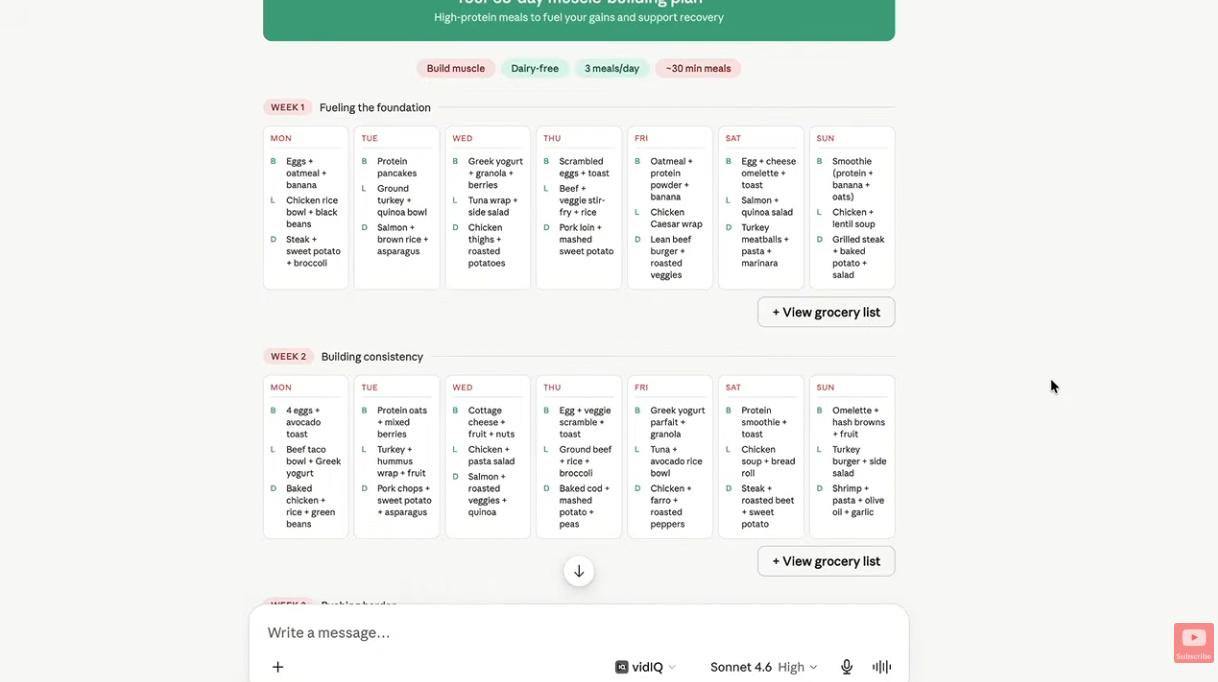
When I was happy with it, I told Claude I'd be using GitHub and asked for the files I'd need. It generated three files, and I downloaded each one.
Want to see how I use Claude to make products people buy? Here's my walkthrough on making digital products with Claude and Canva.
Want Claude to get it right on the first try? Generic prompts get generic results. Mega prompts, plus a brand guidelines document uploaded for context, get you much closer from the very first version.
My free Claude Starter Pack has copy-and-paste templates for both, plus three Claude projects built for business owners.
How do you make your Claude tool live for subscribers?
Right now, your tool only lives inside Claude. Subscribers need a real page with its own URL.
In my demo, I stored the three files on GitHub and connected that repository to a web hosting plan that supports Node.js web apps. Not every hosting plan does, so check before you buy. Here's the flow:
- Create a free GitHub account if you don't have one. GitHub is a separate website that stores your files so your host can access them.
- Create a repository. Give it a name and a description, then choose public or private. Public is fine for a simple tool that doesn't call APIs or need much security. Private is there for anything more involved.
- Upload your files. Choose the option to upload existing files, drag in the three files Claude gave you, and click Commit changes.
- Connect the repository to your host. Create a Node.js web app, connect GitHub, and select only the one repository you just made. Not sure about a domain name yet? A temporary one works, and you can change it later.
- Deploy. The default settings were already optimized in my demo, so I didn't touch a thing. Click deploy, and your tool goes live at its own URL.
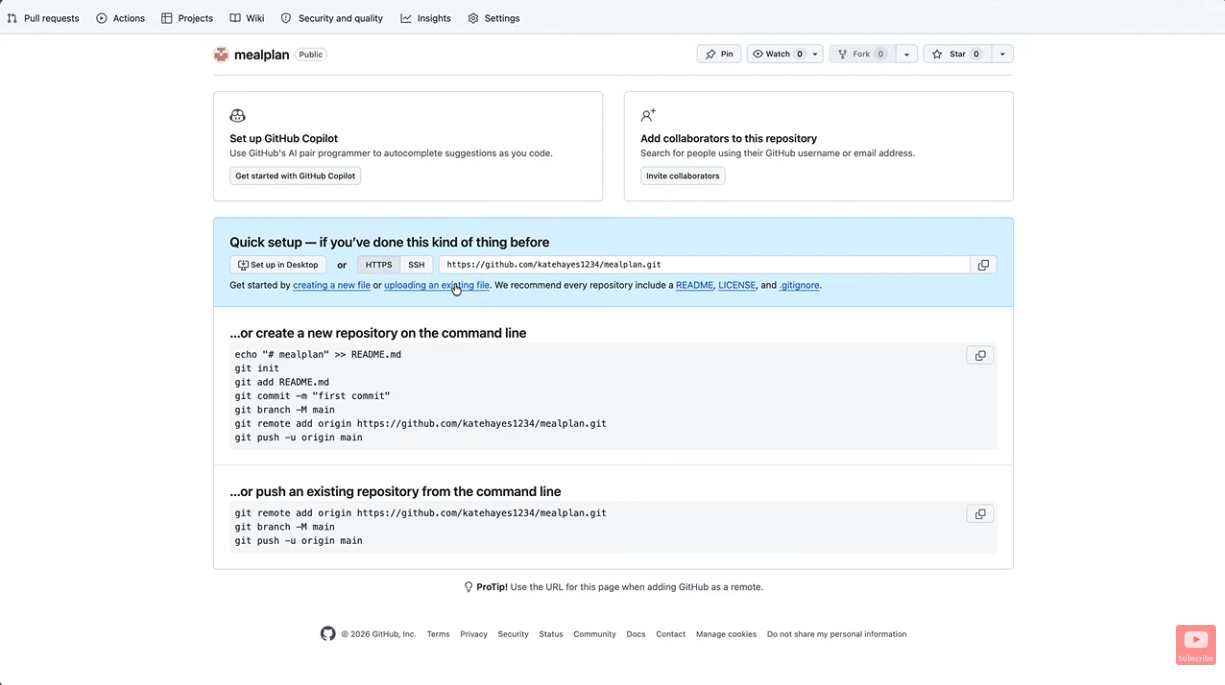
Once it's deployed, open the URL, click through it, and test it live.
A simpler option: Claude can also publish an artifact to a public link on Free, Pro, and Max plans, and it can generate embed code for another website. That link lives on Claude's site rather than your own domain, so it's a quick path if you don't need your own URL. Claude's help center walks through publishing and sharing artifacts.
One honest note: either way, your tool has a public URL, and anyone who has that link can open it. Think of your opt-in page as the front door, not a lock.
What goes on the opt-in page?
The opt-in page is the page you send people to so this whole process can start. Keep it to one page with one job: collect a first name and email address and send them to your email service provider. It isn't an entire website.
Most email service providers have a landing page builder with templates. I suggest starting from a template and editing from there. In the drag-and-drop editor, you can change the colors, fonts, wording, and background photos, and you can add or remove sections.
The most important part is the form. Here's what to set:
- The contact list. Choose which list new subscribers get added to.
- The fields. I kept it to first name and email, and removed the phone number. Two fields, or three at most, means people are less likely to bounce.
- The button text. You can change what the call-to-action button says.
- The redirect. This is where subscribers land right after they click submit. I sent mine straight to the URL of my tool, so people get to use it the moment they sign up.
When it looks right, publish the page. You'll get a unique URL to share, and if you already own a domain, you may be able to connect it to the page.
What is a welcome sequence, and what should it do?
Building a list isn't the whole picture. The list is there for a reason, so you need a plan for what happens next. That's your welcome sequence.
A welcome sequence is a series of three to five emails that go out automatically on set days after someone subscribes. Together, they welcome people, remind them how they ended up on your list, deliver value, build trust, and pitch a paid offer.
There are two parts to set up inside your email service provider:
- The automation. A rule that says: when someone opts in on this landing page, add them to this sequence automatically. You'll build other sequences as your business grows, but this is the first one every new subscriber gets.
- The sequence itself. I use a five-day welcome sequence. Email one goes out instantly. Email two goes out the next day. Email three goes out two days later, and so on.
Once it's set up, nobody has to email each new subscriber by hand. The follow-up runs while you're off living your life. No promises on sales, but a list that never hears from you doesn't have much of a chance.
Email is also where AI gets the least use. Among the 203 AI users in our survey, only 16% (33 of 203) use AI for customer emails. Claude can help you draft yours, so your welcome sequence is a great place to start.
How do you promote your lead magnet?
Nobody will use your tool if they don't know it exists. So shout about it anywhere you show up: Facebook, TikTok, Pinterest, your blog, a podcast, your YouTube videos. Anywhere you meet and engage people, tell them about the free thing you made.
Here's the beautiful part. Once the back end is built (the tool, the live page, the opt-in page, and the welcome sequence), your ongoing work is creating content that points people to your free tool. They move through the funnel on their own.
Need ideas for that content? Start with these 4 strategies for marketing digital products.
Frequently Asked Questions
What is the best type of lead magnet to make with AI?
In my experience, an interactive tool tends to feel more valuable than a static PDF, because it hands each person a personalized result. A quiz, a calculator that helps someone price a product, and a generator that creates something custom from their answers all work. Pick the format that fits your audience's biggest question, like the 30-day meal planner I built for people starting their fitness journey.
Do you need to know how to code to build a lead magnet tool with Claude?
Not in my demo. I described what I wanted in plain English, answered Claude's clarifying questions, and revised the tool with follow-up prompts. The technical part after that was downloading the three files Claude generated, uploading them to GitHub, and connecting them to hosting.
How many questions should an interactive lead magnet ask?
In my demo, I asked Claude for five to six simple questions, followed by a result based on the answers. Short and simple keeps people moving, and a progress bar helps them see how far along they are.
How many fields should an opt-in form have?
Two, or three at most. I collect a first name and an email address and skip the phone number, so people are less likely to bounce off the page.
How long should a welcome sequence be?
Most welcome sequences are three to five emails. I use a five-day sequence: the first email goes out instantly, the second the next day, the third two days later, and so on. Across the sequence, you welcome people, remind them how they joined, deliver value, build trust, and pitch a paid offer.
Can you host a Claude lead magnet tool for free?
It depends on the route. Claude can publish an artifact to a public link on Free, Pro, and Max plans. If you want the tool on your own URL through GitHub, a GitHub account is free, but you'll also need a web hosting plan that supports Node.js web apps, and not every plan does.
What is a mega prompt?
A mega prompt is a robust prompt with lots of context: who you are, who your audience is, what the task is, and what format you want. Pairing it with an uploaded brand guidelines document helps Claude get it right on the first try instead of giving you generic results.
Ready to use AI to build your business, not just your tools?
Kate AI is for anyone who wants to use AI tools like Claude and ChatGPT to create products, write marketing, and run their business.
So, what would your first tool be: a quiz, a calculator, or a generator? Hit reply on my next email and tell me. I read every one.
Not on my list yet? Grab the Claude Starter Pack and you'll be automatically added!
